Turn Your Photography Into Posters
Your photo archive probably contains pictures that would work beautifully as posters, even if you have never thought of them as wall art. Look for a scene with a strong outline, a readable arrangement of light and shade, and something that still holds your attention when the image is small. A poster treatment gives you a reason to revisit those files. The useful question is what you want the finished picture to emphasize: the shape of a building, the rhythm of a crowd, the relationship between people and landscape, or simply a few colors that belong together.
The ruined arch in this image provides a practical example. A broad curve of limestone crosses the lower part of the frame, joining a broken wall that rises along the right edge. Dense foliage fills the left side, and a wooded hillside closes the background without a strip of sky. Two visitors sit together above the arch while a third leans forward beside the taller wall. The photograph already contains the structure a poster needs: a sweeping curve, a heavy vertical mass, a darker counterweight and three small figures that establish scale. Editing can strengthen those relationships because they are present in the composition from the start.
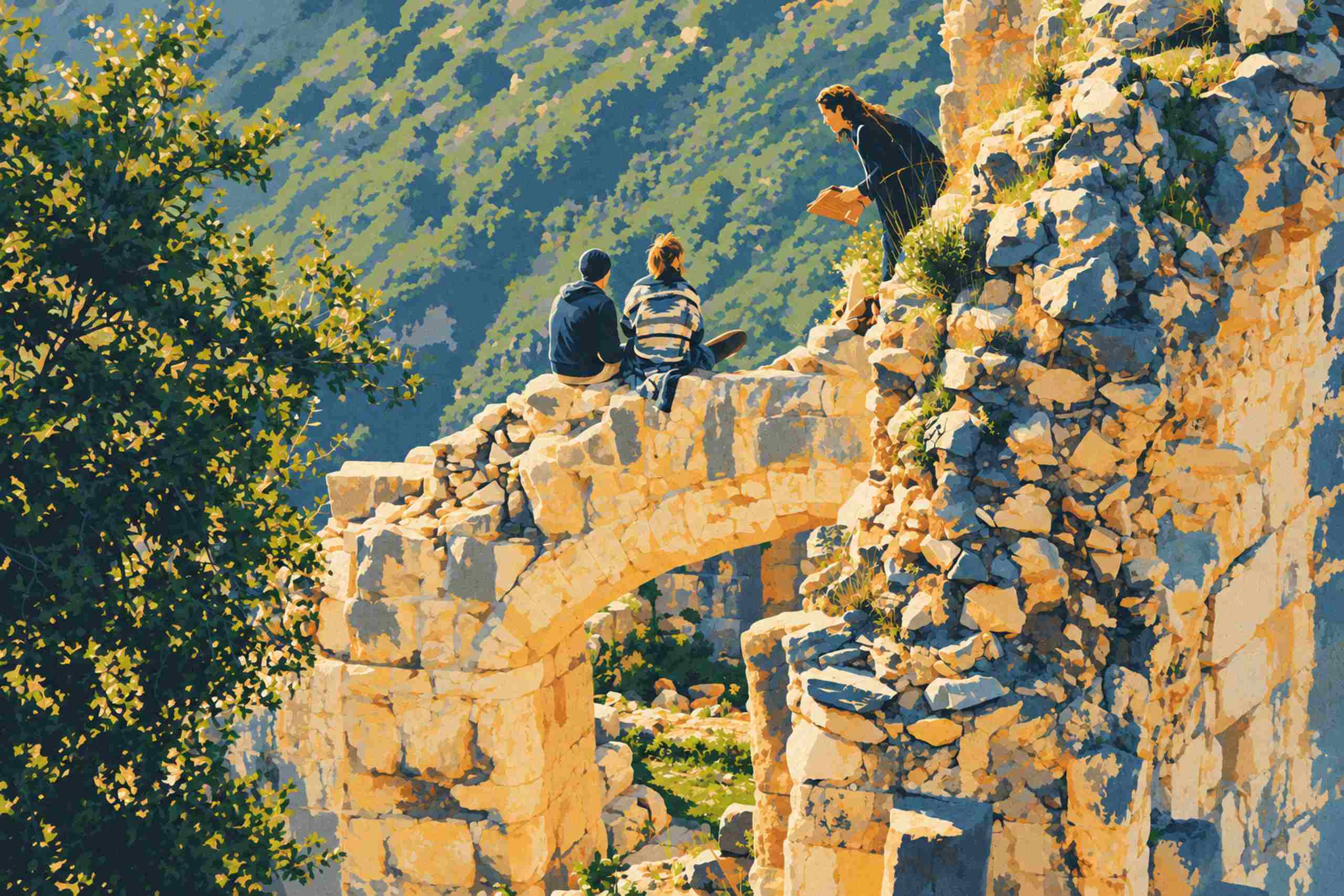
In the finished artwork, the stone has become a patchwork of honey yellow, pale cream and ochre, with navy and slate shadows collecting between the blocks. The arch remains easy to follow despite its rough surface. At the right, the wall breaks into angular fragments, interrupted by little tufts of vegetation. The tree at the left becomes a dense arrangement of forest green and almost black shapes, scattered with yellow-green highlights. Behind everything, the hillside falls into softer diagonal patches of sage and dusty blue. This difference in treatment matters: the foreground feels solid and close, while the slope remains a quieter field of color.
The people keep the scene from becoming an exercise in masonry. The seated figure on the left wears a dark blue top and cap; the companion has tied-back hair and a garment divided into pale and blue bands. Higher on the right, the standing visitor’s dark clothing forms a clear silhouette against the warm stone, with an orange object extending from the hands. Faces carry little detail, yet the gestures remain legible. When you simplify your own photographs, watch these small anchors carefully. A hand merging into a wall or a head disappearing into foliage can weaken the entire scene, even when the larger colors look attractive.
Begin with your best available original and keep the poster treatment in a separate working file. Correct an unwanted color cast, settle the crop and make the main tonal relationships clear before adding a stylized effect. An aggressive contrast adjustment can close shadows that contain useful outlines, so check the people and important edges as you work. Try viewing a small thumbnail or temporarily looking at the image in black and white. If the main subject disappears at that stage, a limited palette may need some local adjustments to separate it from its surroundings. Cropping can help, although here the tree and the right-hand wall both contribute enough to deserve their space.
There are several routes from that prepared photograph to a poster. A conventional posterize adjustment reduces the number of tonal steps, producing distinct bands where the original had smooth transitions. Color reduction, selective recoloring and hand-painted masks give you more control over the palette and boundaries. A generative transformation can reinterpret the scene more freely, which makes careful comparison with the source especially useful. Choose the route according to how much control you need over the original geometry. If the position of a person, the shape of an arch or the exact outline of a building matters, inspect those features individually before accepting the result.
For a conventional editing workflow, place the posterization on an adjustment layer or a duplicate layer where possible, then compare several strengths. Very few tonal steps can make an image striking but leave awkward bands across faces or uneven patches in a bright wall. More steps preserve texture but may keep the photograph visually busy. There is no ideal setting for every file. Move between a close view and a fit-to-screen view, and judge whether each change makes the subject easier to read. A little selective smoothing before color reduction can calm fine foliage or noisy shadows, but stop before the stone edges and small figures lose their definition.
A deliberate palette usually does more for the result than a stronger effect. In this example, warm limestone sits against cool greens and blues, while a shared navy shadow color ties clothing, leaves and masonry together. You can work toward that kind of consistency by adjusting color groups separately rather than increasing saturation across the entire frame. Keep a clear difference between the lightest stone, the middle tones of the slope and the darkest foliage. Texture can soften flat areas, though a grain layer should support the image rather than cover weak transitions. Let the architecture remain angular and the leaves remain irregular; simplifying a photograph need not give every surface the same treatment.
Check the design at the size and distance at which it will be seen. On a wall, the curve of this arch and the dark tree will register before the small joints between stones. That gives you a useful editing priority: establish the large shapes first, then refine the details that reward a closer look. Text is optional. A location name or short title can be useful for a travel-poster design when there is room for it, but this composition already fills the frame and reads comfortably without lettering. A border is another design choice, and should be tested as part of the whole picture rather than added automatically.
Printing needs a separate export from the small file used on a website. Keep the highest-resolution finished version, check the intended paper proportions and ask the printer about file format, color handling, margins and any bleed needed for trimming. For a concrete size example, a 6000 by 4000 pixel file gives 20 by 13.3 inches at 300 pixels per inch; that is a calculation from pixel dimensions, not a promise about how every image will print. Enlarging a smaller file increases its pixel count without restoring detail lost from the original. A proof or a full-size crop on the intended paper is useful for judging hard color boundaries, fine grain and deep shadows before committing to a larger print.
The earlier article on turning photographs into graphic scenes explores the visual appeal of the approach through a busy restaurant interior. This landscape offers a different exercise: keeping an open view readable while giving rough stone and foliage a stronger graphic identity. Start with one photograph you already enjoy, save a few variations and return to them after a break. The strongest version may be quieter than your first attempt. Here, the arch, the wooded slope and those three visitors do most of the work; the palette gives them a new way to hold together.