Sodium, LED, and a Blue Searchlight: Why One White Balance Cannot Serve a Night Cityscape
There are at least four different light sources in this frame and no single white balance setting is correct for any of them. The residential streets below are running on old sodium, somewhere around 2000K, which is the deep amber you see across most of the lower half. The port is lit with newer floodlights, considerably cooler and closer to neutral. Office windows are fluorescent green. And the searchlight cutting across the bay is xenon, up past 6000K, which is why it reads as blue against everything else.
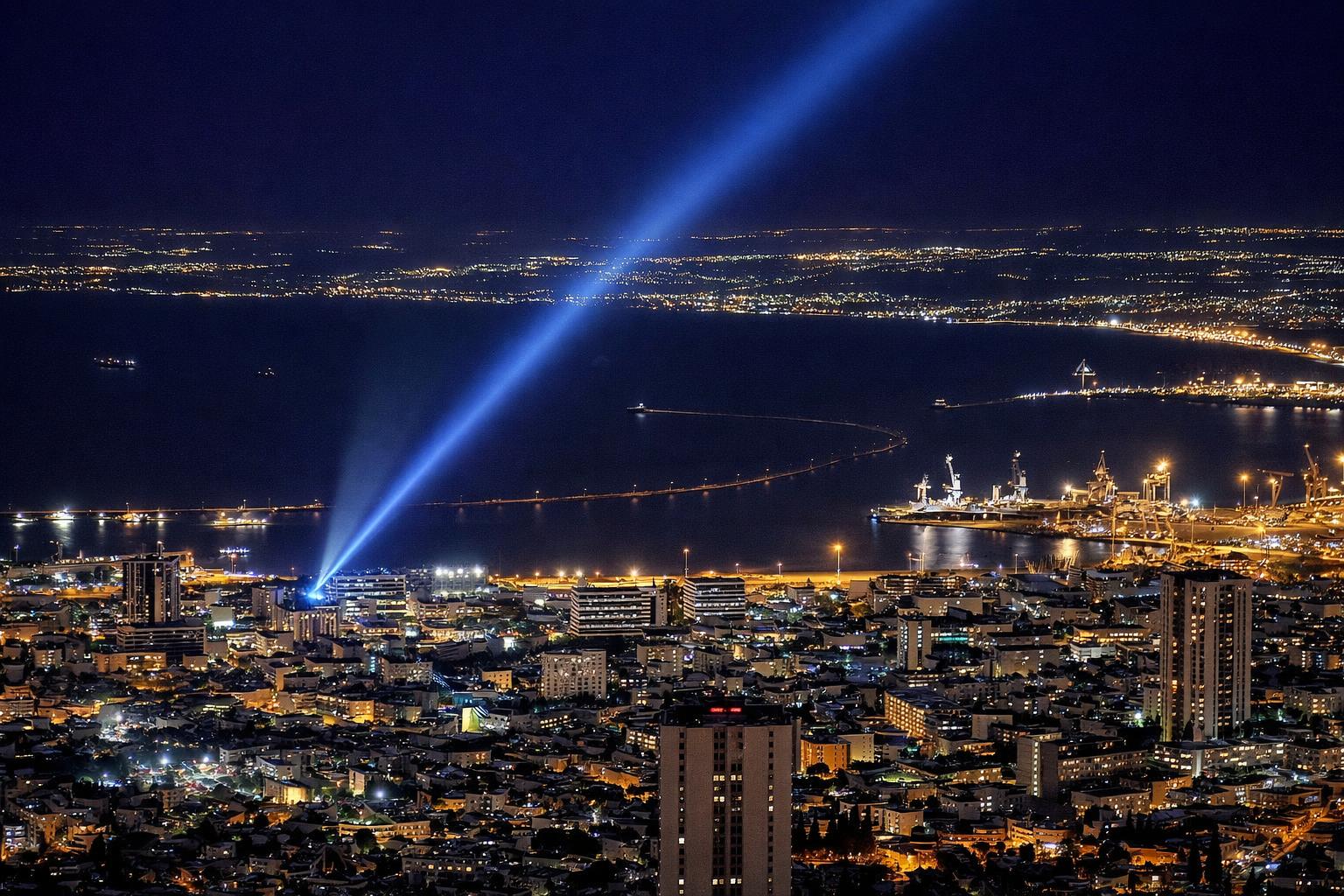
This is the actual difficulty of night cityscapes, and it is not exposure. Exposure at night is a solved problem once you are on a tripod. Colour is where the frames fall apart.
What auto white balance does to this
Auto white balance looks at the scene and tries to find neutral. In a frame that is eighty percent amber, it decides the amber is the error. It then cools the entire image until the streets look grey.
The result is a city that looks like a parking garage. The sodium goes muddy beige, the sky picks up a blue cast it did not have, and the searchlight, which was the entire reason for the photo, drops to a pale grey line because you just removed the blue that made it visible.
Auto has no way to know that the orange is the subject and not a mistake. Turn it off for this kind of work. Set a manual Kelvin value in camera so your review images are consistent, then fix it properly in raw.
Do not neutralise the sodium
The instinct, once you are in the raw converter, is to drag the temperature slider until the streets look white. Resist that.
Two things go wrong. First, correcting a 2000K source to neutral requires so much cooling that everything else in the frame goes cyan. The sky turns an artificial teal, the port lights go grey, and the searchlight beam loses its identity. Second, and more important, nobody experiences a city that way. Standing on that hillside, the streets look orange. Your eye adapts locally, in patches, which is something no global slider can imitate.
The orange is information. It tells you the neighbourhood has old lamps, it separates the residential grid from the industrial port, and it provides the colour contrast that makes the blue beam legible. Remove it and you have a grey photograph of some buildings.
Anchor on the sky instead
The workable approach for a frame like this is to pick the sky as your reference and let everything else fall where it falls.
Start around 3800K to 4200K and judge only the darkest area of sky, the part with no city glow in it. When that reads as a plausible near-black with a slight cool lean, stop. Do not look at the buildings while you do this. The streets will still be strongly orange and that is the correct outcome.
Then check the tint axis separately. Fluorescent and older mercury vapour lamps push green, and no amount of temperature adjustment touches green because temperature runs on the blue-to-amber axis only. If your office windows look sickly, that is tint, not temperature. A small magenta push usually fixes it and costs you little elsewhere.
Then work locally
Global white balance gets you eighty percent of the way. The rest is masks.
Colour range selection is the fast tool here. Sample the sodium areas and pull them back slightly, four or five hundred Kelvin, just enough to stop them glowing. Sample the beam and give it a small saturation lift if the raw conversion flattened it. Both adjustments should be too small to point at in the finished file.
The saturation control in HSL is more useful than the master saturation slider for this. Sodium orange saturates fast and clips to a flat crayon colour before anything else in the frame does. Pull the orange channel down, push luminance up a little, and the streets keep detail instead of turning into a solid mass.
Shoot raw, obviously, but know why
Everyone repeats that white balance is free in raw. It is worth being precise about what that means, because it is not quite free.
The sensor records three channels and the raw file keeps all of them. Changing temperature later is a matter of reweighting those channels, which is lossless in principle. In practice, a channel that was underexposed at capture gets noisy when you amplify it. Under heavy sodium light, the blue channel receives almost nothing. Cool that file aggressively in post and the blue channel noise comes up with it, which is why heavily corrected night shots look grainy in the shadows even at moderate ISO.
So getting close in camera still matters. Not for the colour, for the signal.
The sodium is disappearing
One practical note. Cities are replacing sodium street lighting with LED at speed, and it is changing what night photography of urban areas looks like. LED runs cool and even, typically 3000K to 5000K, with none of the amber that gave night cityscapes their warmth for sixty years.
Photographically this is a downgrade. LED-lit cities photograph flat and slightly clinical, the colour separation between districts vanishes, and the high blue content blows out more easily on distant point sources. Whether you like the look or not, the frames you can take today are not the frames you will be able to take in ten years.
If your city still has amber neighbourhoods, go shoot them.
The test
Before you touch a slider, name the light sources in the frame. Sodium, LED, fluorescent, xenon, headlights, illuminated signage. Once you can name them, you can decide which one you are keeping and which ones you are willing to let go strange.
The mistake is trying to keep all of them.